
Last updated on
Nov 7, 2026

MD Vehicle Accident or Damage Report - Anne Arundel County 2006-2026 free printable template
pdfFiller is not affiliated with any government organization

Fill out
Complete the form online in a simple drag-and-drop editor.

eSign
Add your legally binding signature or send the form for signing.

Share
Share the form via a link, letting anyone fill it out from any device.

Export
Download, print, email, or move the form to your cloud storage.
Why pdfFiller is the best tool for your documents and forms


End-to-end document management
From editing and signing to collaboration and tracking, pdfFiller has everything you need to get your documents done quickly and efficiently.
Accessible from anywhere
pdfFiller is fully cloud-based. This means you can edit, sign, and share documents from anywhere using your computer, smartphone, or tablet.
Secure and compliant
pdfFiller lets you securely manage documents following global laws like ESIGN, CCPA, and GDPR. It's also HIPAA and SOC 2 compliant.
What is MD Vehicle Accident or Damage Report - Anne Arundel County
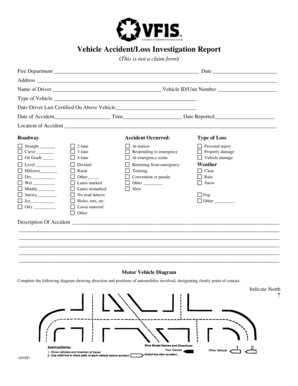
The Vehicle Accident or Damage Report is a government form used by Anne Arundel County, MD employees to document vehicle-related incidents and injuries within 24 hours.
pdfFiller scores top ratings on review platforms




Who needs MD Vehicle Accident or Damage Report - Anne Arundel County?
Explore how professionals across industries use pdfFiller.

MD Vehicle Accident or Damage Report - Anne Arundel County is needed by:
-
County employees involved in vehicle accidents.
-
Supervisors needing to verify accident reports.
-
Risk Management departments reviewing accident details.
-
Insurance agents handling related claims.
-
Legal departments for liability assessments.
Comprehensive Guide to MD Vehicle Accident or Damage Report - Anne Arundel County
What is the Vehicle Accident or Damage Report?
The Vehicle Accident or Damage Report serves as a crucial document for employees in Anne Arundel County, MD, to report any vehicle-related incidents involving county vehicles. This report not only aids in documenting accidents but also assists in the management of potential injuries or damages. It is utilized by various stakeholders, including government officials and insurance representatives, to ensure proper handling of accidents.
Purpose and Benefits of the Vehicle Accident or Damage Report
The primary purpose of this report is to provide a formal process for reporting damages or injuries sustained during vehicle incidents. Filing this report promptly ensures that necessary actions are taken swiftly to address the situation. Timely reporting can lead to quicker resolution of claims, improving safety measures and accountability within the county operations.
Additionally, benefits for employees include a structured way to communicate incidents and protections under workers' compensation regulations, while the county can better manage risk and liability associated with its vehicle operations.
Who Needs the Vehicle Accident or Damage Report?
This report must be filled out by employees involved in the vehicle accident, with supervisors also playing a critical role in the process. Employees are required to complete the form accurately to reflect the circumstances of the incident, while supervisors must review and approve the submission to ensure compliance with county protocols.
Conditions necessitating the report include any accidents involving county vehicles, regardless of the severity, to maintain a comprehensive record of incidents for insurance and safety assessments.
Key Features of the Vehicle Accident or Damage Report
-
Employee information fields, including name and contact details.
-
Accident specifics such as date, time, location, and description.
-
Details about any passengers or witnesses involved.
-
Insurance information for claim processing.
-
Signature requirements from both the employee and supervisor to validate the report.
These components are essential for thorough documentation and facilitate a clear understanding of the circumstances surrounding the incident.
How to Fill Out the Vehicle Accident or Damage Report Online (Step-by-Step)
-
Access the online form and begin by entering your personal details in the designated fields.
-
Provide specifics about the accident, including the date, time, and location.
-
Fill in any passenger or witness information if applicable.
-
Complete the insurance section with relevant policy details.
-
Review the form for accuracy and completeness before submission.
-
Obtain signatures from both employee and supervisor, ensuring all requirements are met.
Clarifying sections such as "EMPLOYEE’S FIRST NAME" and "SIGNATURE OF SUPERVISOR" helps ensure the form is correctly filled out, minimizing errors.
Common Errors and How to Avoid Them
-
Omitting required signatures from the employee or supervisor.
-
Providing inaccurate details about the accident or vehicle.
-
Neglecting to include all necessary information about witnesses or passengers.
To avoid these pitfalls, double-check all entries and ensure compliance with the required reporting procedures. Reviewing the report in its entirety before submission can prevent delays and complications.
Submission Methods and Delivery
Once the Vehicle Accident or Damage Report is completed, it must be submitted to the Risk Management department. You can submit the form via fax or follow any specific instructions provided for electronic submission. Adhering to submission deadlines is critical to ensure timely processing and to meet any insurance requirements.
What Happens After You Submit the Vehicle Accident or Damage Report?
After submission, the report undergoes processing by the Risk Management team, which evaluates the details provided for any necessary follow-up actions. Employees will receive confirmation of their submission, with options to track the progress of their report. This systematic approach ensures that all accidents are reviewed transparently and effectively.
Security and Compliance for the Vehicle Accident or Damage Report
Handling the Vehicle Accident or Damage Report requires stringent security measures to safeguard personal and sensitive information. The platform used for these submissions, such as pdfFiller, complies with security standards including HIPAA and GDPR. Ensuring that these standards are met protects the users' data throughout the reporting process.
Easily Complete Your Vehicle Accident or Damage Report with pdfFiller
Utilizing pdfFiller provides an efficient and secure way to complete the Vehicle Accident or Damage Report. Users can edit, eSign, and submit forms seamlessly from any browser without the need for downloads. This platform prioritizes user security while simplifying form management processes, making it easier for employees to fulfill reporting obligations.
How to fill out the MD Vehicle Accident or Damage Report - Anne Arundel County
-
1.To begin, navigate to pdfFiller and search for the Vehicle Accident or Damage Report form. Once located, click on the form to open it in the editing interface.
-
2.Review the form layout. Familiarize yourself with the blank fields and checkboxes, ensuring you know where to enter information and what is needed.
-
3.Before filling out the form, gather the necessary information including details about the accident, names of passengers, witnesses, and relevant insurance details.
-
4.Start filling out the form using the text fields by clicking on each box. Enter your first name, street address, and other required details. Make sure to type clearly.
-
5.If applicable, use the checkboxes to indicate the type and extent of damage or injury. Be thorough to ensure all aspects of the incident are covered.
-
6.Once all sections are completed, carefully review the information you entered. Check for accuracy and ensure all required fields are filled in.
-
7.After verification, locate the signature fields for both you and your supervisor. Use the signing tools available in pdfFiller for digital signing.
-
8.Once the form is signed, you can save it directly to your device. Choose the download option or save in your pdfFiller account for easy access later.
-
9.If needed, fax the completed form to Risk Management per department protocol. Follow any specific submission instructions provided by your organization.

Who is required to fill out the Vehicle Accident or Damage Report?
The form must be completed by the employee involved in the vehicle accident and requires additional signatures from their supervisor.
Is there a deadline for submitting the Vehicle Accident or Damage Report?
Yes, the report must be submitted within 24 hours of the incident occurring to ensure timely processing and compliance with county regulations.
What should I do if I forget some details required in the form?
Try to gather all necessary information such as witness names and insurance details before starting. If information is still unavailable, note the absence in the relevant sections.
How can I submit the completed Vehicle Accident or Damage Report?
Once completed, you can fax the report to the Risk Management department as instructed. Ensure to keep a copy for your records.
Are there any supporting documents needed with the form?
Generally, you may need to attach copies of accident reports from authorities, witness statements, and any insurance documentation related to the incident.
What are common mistakes to avoid when filling out the form?
Ensure all sections are filled completely, use legible handwriting or type, and double-check for signatures. Missing information can delay processing.
What happens after I submit the Vehicle Accident or Damage Report?
Once submitted, the report will be reviewed by the Risk Management department, who may follow up for additional information or clarification as needed.
Related Content
Related Forms




Related Catalogs
Get the latest insights from our blog


If you believe that this page should be taken down, please follow our DMCA take down process
here
.
This form may include fields for payment information. Data entered in these fields is not covered by PCI DSS compliance.